
পদ্ধতি পরিচিতি ও কার্যপ্রণালী বিশ্লেষণ Operational Architecture & Gateway Mechanics
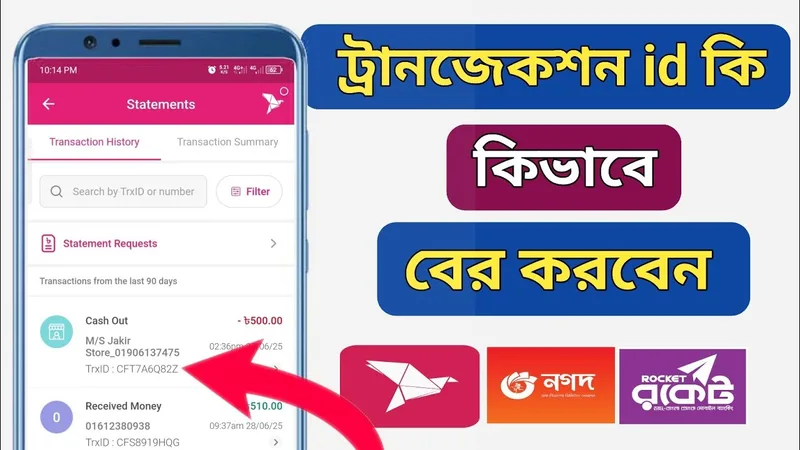
TrxID (ট্রানজেকশন আইডি) হলো প্রতিটি মোবাইল আর্থিক লেনদেনের জন্য সেন্ট্রাল ব্যাংকিং সার্ভার দ্বারা তৈরি একটি অনন্য ডিজিটাল কোড। Jaya9 এর ক্যাশিয়ার সিস্টেম সরাসরি এমএফএস গেটওয়ের সাথে সংযুক্ত। খেলোয়াড় TrxID পেস্ট করার পর স্বয়ংক্রিয় ক্রিপ্টোগ্রাফিক অ্যালগরিদম ট্রানজেকশনের পরিমাণ, প্রেরকের নম্বর এবং সময় মিলিয়ে দেখে সাথে সাথে অ্যাকাউন্টে টাকা যুক্ত করে।
A Transaction ID (TrxID) is a cryptographically unique alphanumeric identifier generated by mobile financial networks upon successful fund transfer. Jaya9 automated cashier APIs query the MFS gateway to verify the exact amount, timestamp, and sender wallet, approving credits within 60 to 120 seconds.
যাচাইকৃত লেনদেন স্পেসিফিকেশন টেবিল Verified Cashier Limits & Processing Benchmarks
| প্যারামিটারParameter | যাচাইকৃত বিবরণVerified Specification |
|---|---|
| পেমেন্ট চ্যানেল (Channel) | TrxID Automated Verification Architecture |
| সর্বনিম্ন জমা (Min Deposit) | ৳২০০ BDT |
| সর্বোচ্চ লেনদেন (Max Limit) | ৳৫০,০০০ BDT |
| অনুমোদনের গতি (Speed) | স্বয়ংক্রিয় এপিআই ভেরিফিকেশন (৬০ সেকেন্ড) |
| সার্ভিস ফি (Service Fee) | ০% চার্জ |
| ট্রানজেকশন আইডি ফরম্যাট (TrxID) | বিকাশ: ১০ অক্ষর (BLA9X7K2PQ) | নগদ: ৮ অক্ষর (7H9K2L3M) |
| অফিশিয়াল গেটওয়ে (Official Website) | bkash.com ↗ |
ধাপে ধাপে ডিপোজিট সম্পন্ন করার নির্দেশিকা Step-by-Step Deposit Walkthrough
ভুল লেনদেন এড়াতে নিচের পরীক্ষিত ধাপগুলো সাবধানতার সাথে অনুসরণ করুন:
- ধাপ 1: বিকাশ বা নগদে টাকা পাঠানোর পর এসএমএস বা অ্যাপ স্ক্রিন থেকে TrxID কপি করুন।
- ধাপ 2: Jaya9 ডিপোজিট পেজে প্রদর্শিত "Transaction ID" ফিল্ডে এটি পেস্ট করুন। কোনো স্পেস বা অতিরিক্ত অক্ষর বাদ দিন।
- ধাপ 3: "Submit" বাটনে ক্লিক করুন। গেটওয়ে রোবট তাৎক্ষণিক এমএফএস ডাটাবেসের সাথে তথ্য মিলিয়ে নেবে।
- ধাপ 4: যাচাই সফল হলে স্ক্রিনে সবুজ টিক চিহ্ন প্রদর্শিত হবে এবং ব্যালেন্স যুক্ত হবে।
- Step 1: Copy the TrxID directly from your MFS confirmation notification or transaction ledger.
- Step 2: Paste the string into the Transaction ID input field, ensuring zero leading or trailing spaces.
- Step 3: Click Submit to initiate automated API query with the MFS database.
- Step 4: Upon confirmation match, the screen displays a verified badge and your player wallet is credited.
লেনদেন সমস্যা সমাধান ও ট্রাবলশুটিং (Troubleshooting) Cashier Troubleshooting & Problem Resolution
কখনই একই TrxID দুইবার সাবমিট করবেন না (ডুপ্লিকেট এরর দেখাবে)। টাইপিং ভুল হলে TrxID কপি করে সরাসরি পেস্ট করুন। মনে রাখবেন, ক্যাশিয়ারে প্রদর্শিত নম্বরগুলো নিয়মিত আপডেট হয়। পূর্ববর্তী কোনো সেভ করা নম্বরে সরাসরি টাকা পাঠাবেন না; সর্বদা নতুন ট্রানজেকশন শুরু করার সময় ক্যাশিয়ার থেকে নম্বর সংগ্রহ করুন।
Never attempt duplicate submission of a single TrxID. Always copy and paste directly to prevent character mistyping (such as confusing the letter O with number 0). Always verify the recipient wallet dynamically in the cashier before dispatching funds; never recycle previously utilized agent numbers from your phonebook.